
SYNCING.NET for iOS Business Edition

- All the benefits of Free Edition, plus:
- Share data with other SYNCING.NET users
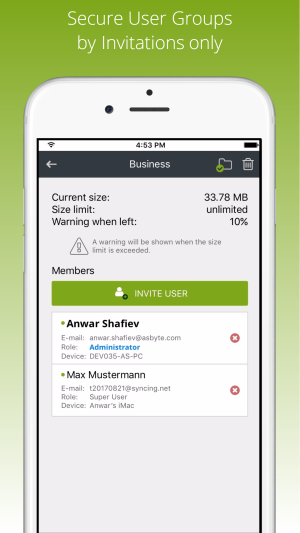
- Closed user groups by invite only
- Assign and use individual user rights
- Unlimited data traffic
- Intermediate external file storage on demand
- Preferred support via e-mail
- Description
- Testimonials
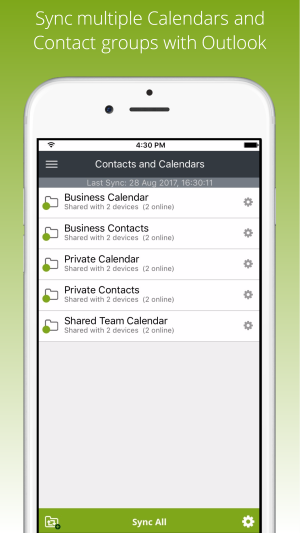
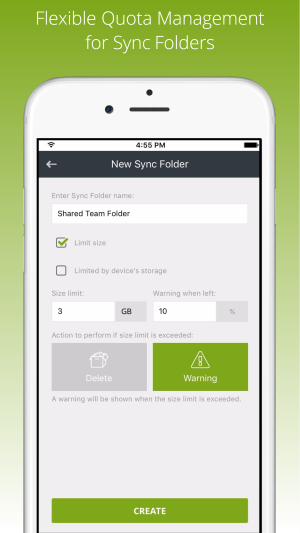
Complete solution for the entire company and workgroups. Share Outlook calendars, contacts, and documents with other SYNCING.NET users, assign individual user rights and folder size limits.

Real customers. Real reviews.
Simplify a work process for you and your colleagues!
New business software
Today, any modern office is associated with computers. The computers solve many problems helping automate work processes and reporting. It is often very important to connect desktop computers and mobile devices at the office into a common network. Many people use one of the most popular smartphones in the world – iPhone. It is powerful and easy to use. iPhone can be used not only in your private life, but also in a corporate environment. Our app SYNCING.NET Business Edition for iOS allows you to solve many business tasks. It can seamlessly sync iPhone over Wi-Fi. For example, it can be used to synchronize business documents and Outlook appointments and contacts between iPhone and desktop computers and other mobile devices.
Any office must be productive. One of the keys to success is to use automation tools and apps together, which allow to solve many tedious tasks. One of such an app is the SYNCING.NET Business Edition for iOS. Don’t waste your time and try the advantages of the SYNCING.NET iOS sync now. SYNCING.NET keeps data up to date on multiple devices automatically. You don’t need to copy files and update contacts or events manually. SYNCING.NET will synchronize all changes across all desktop and mobile devices automatically at real time. You can concentrate on more important things. Be more productive with SYNCING.NET! SYNCING.NET is a unique cross-platform system and can be used on desktop computers and mobile devices like iPhone or iPad.
Always online
PCs help fulfil different tasks in various departments of a small company or a big enterprise. Unfortunately, very often the work is not finished at the office and many employees work also from home. In this case it is very important to have data in sync on the office and home desktop computers or mobile devices, for example, on your iPhone. This is where the SYNCING.NET Business Edition for IOS can help.
Microsoft Outlook has become a standard email manager at many companies. It allows employees to exchange corporate emails with attachments, store contacts, create schedules using a powerful calendar, define tasks and write notes. However, the functionality to sync multiple devices in Outlook is not available out of the box. SYNCING.NET can be very useful in a corporate environment. SYNCING.NET is a unique software, which allows to sync files and Outlook data. For example, sync Outlook calendar with iPhone, sync iPhone contacts with Outlook, sync iPad, sync iPhone photos to Mac, sync music to iPhone, sync music to iPod, and so forth. SYNCING.NET can share any types of files including Office documents, music, videos, PDFs, etc.
With SYNCING.NET you don’t need to carry paper documents or copy files manually between devices using portable media like USB-sticks or external hard drives. SYNCING.NET runs in the background and keeps your documents up to date on all devices automatically. Outlook contacts and appointments can be synced as well. SYNCING.NET does not affect your work and helps you save time tremendously. Using SYNCING.NET you can easily sync iPhone to computer and access your documents, contacts, and calendars on your iPhone and on other desktop computers and mobiles devices.
With SYNCING.NET your data is safe, as it is never stored on the cloud. Your data is transferred directly between devices using multi-level encryption. With SYNCING.NET you can sync calendar with iPhone and will not miss any event, your contacts will be always actual, you can access your documents on your iPhone or iPad anywhere and at any time. Future versions will allow you to sync Outlook tasks with iPhone.
Advantages
Many companies develop add-ons for popular programs extending their functionality. The SYNCING.NET Business Edition for iOS is a perfect example. It allows you to sync documents and Outlook contacts or appointments between your desktop computer and iPhone or iPad without Microsoft Exchange server. Moreover, SYNCING.NET works on all major platforms like desktop computers Windows, macOS, Linux and mobile devices iPhone/iPad, Android smartphones and tablets, Windows Phone. SYNCING.NET has many useful features:
- Unlimiteddatatrafficatthehighestpossiblespeed.
- Individualuserrightsinthesyncgroups.
- Enclosedusergroupsbyinvitationsonly.
- Safe data storage (no cloud!).
- Free technical support from developers.
You don’t need special IT knowledge in order to use the app. SYNCING.NET can be configured and used without IT administrators. It also does not require any additional servers or software. For small and medium businesses, this can significantly reduce IT costs. All you need is just SYNCING.NET for your devices. You can easily sync iPhone with PC. SYNCING.NET can be seamlessly used on desktop computers Windows, macOS, Linux and on mobile devices iOS, Android, Windows Phone. For instance, you can sync Windows Phone with Mac, etc.
You can purchase SYNCING.NET now. Please visit our website for more details. All SYNCING.NET apps can be configured with a couple of clicks. SYNCING.NET can become your invisible assistant right now.
SYNCING.NET offers other apps for different purposes. For example, iphone sync freeware, a app for Android file exchange, and others. You can download the apps for free. In case of questions, our support team can help you.
